How to turn on sign language in the Apple TV app (ASL and BSL)
Apple TV's new Sign Language feature launches today with Being Heumann. Exact steps for iPhone, iPad, Apple TV 4K, Mac and smart TVs, plus fixes.

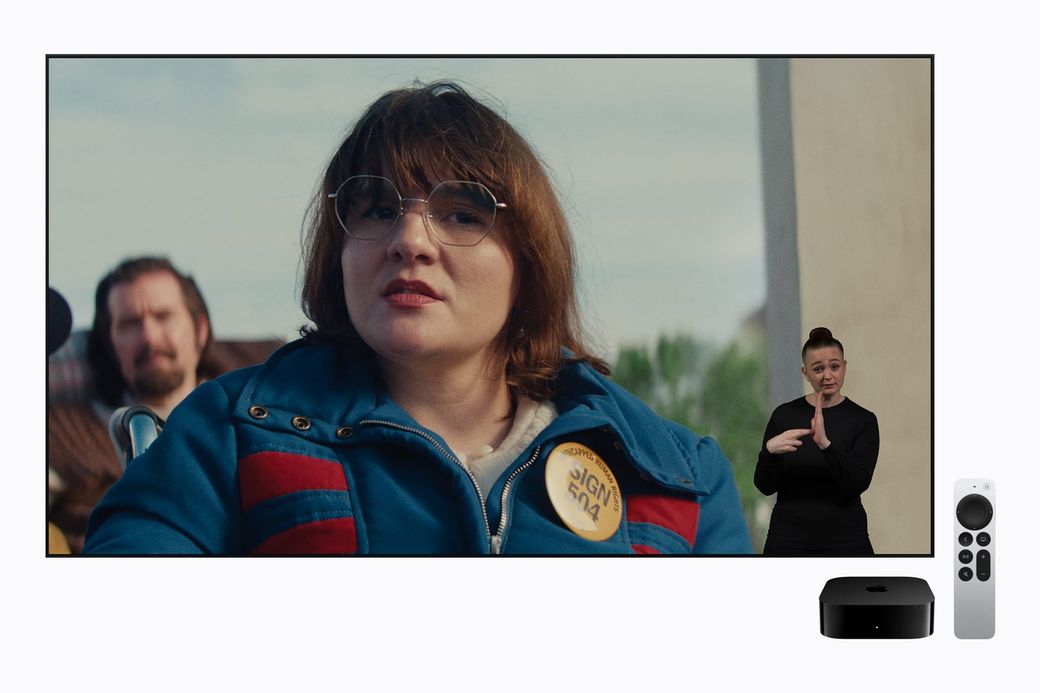
Quick answer: update to iOS 27.2, iPadOS 27.2, macOS 27.2 or tvOS 27.2. Turn on Sign Language in the TV app's settings. On iPhone and iPad that's Settings > Apps > TV. Then start a supported film, such as Being Heumann, which premieres today, or F1. Tap the Sign Language button in the playback controls and choose American (ASL) or British (BSL). An interpreter appears in the corner of the picture.
The skim
- New today: Apple's Sign Language feature in the Apple TV app debuts Friday, Nov. 13, alongside the streaming premiere of Being Heumann. F1 also supports it, and Apple says Way of the Warrior Kid and Greyhound follow later this year.
- What you need: an Apple device on version 27.2 or later, or a supported third-party device running the latest Apple TV app. You also need an Apple TV subscription to watch Apple Originals.
- One gotcha: with Sign Language on, downloads on iPhone and iPad are about twice the size, because Apple also downloads the separate ASL/BSL version.
Before you start
- Software: Apple's announcement says the feature needs iOS 27.2, iPadOS 27.2, macOS 27.2, tvOS 27.2 or visionOS 27.2 or later. On smart TVs, streaming sticks and consoles, it says to use "the latest app software."
- Subscription: Apple lists Apple TV at $14.99 a month after a 7-day free trial for new subscribers (checked Nov. 13). Buyers of a new Apple device can get 3 months free if they redeem within 90 days, and Apple TV is included in Apple One.
- Languages: American Sign Language and British Sign Language only, for now.
How to turn on Sign Language on iPhone or iPad
- Update to iOS 27.2 or iPadOS 27.2 or later (Settings > General > Software Update).
- Open the Settings app. Don't open the TV app for this step.
- Scroll down, tap Apps, then tap TV.
- Turn on Sign Language.
How to turn it on on Apple TV 4K
- Update to tvOS 27.2 or later (Settings > System > Software Updates).
- Open Settings on the Apple TV.
- Go to Apps > TV.
- Select Sign Language and turn it on.
How to turn it on on a Mac
- Update to macOS 27.2 or later.
- Open the TV app, then choose TV > Settings from the menu bar.
- Click Playback, then turn on Sign Language.
How to turn it on on a smart TV, streaming stick or console
- Update the Apple TV app on your TV or device.
- Open the Apple TV app, open the sidebar, then select Settings.
- Go to Accessibility > Sign Language.
Apple notes that not every feature is available on every smart TV, streaming device or console, or in every country.
How to watch a movie with an interpreter
- Look for the Sign Language icon (a raised hand) on a title's page, next to badges like AD for audio description. You can also search for phrases like "with ASL" or "with BSL." Apple says a "Movies & Shows with American Sign Language" collection will gather titles in one place.
- Start playing the movie, then bring up the playback controls.
- Select the Sign Language button above the progress bar and choose American (ASL) or British (BSL).
- The interpreter appears in the lower-right corner, over the film. To hide it, open the same menu and choose Off.
Troubleshooting
- No Sign Language switch in Settings: you're almost certainly below version 27.2. Update, then check Settings > Apps > TV again.
- Setting is on, but there's no button during playback: the title doesn't support it. Right now that means Being Heumann and F1. Most of the catalog doesn't have it yet.
- It's not showing on your TV: update the Apple TV app on the TV. Apple says availability varies by device and region.
- Downloads filling up your phone: turn Sign Language off before downloading if you don't need the interpreted version. Apple says files are roughly double the size with it on.
- Wrong language: switch between ASL and BSL in the playback menu.
FAQ
Is this the same as captions? No. Captions are text. This is a filmed sign language performance, and Apple says it was designed and tested by Deaf and native signers. Daniel Durant, who appears in Being Heumann, directed that film's interpretation.
Does it work on Android or Windows? Apple only commits to "supported third-party devices running the latest app software." Check your device's Apple TV app settings for the option.
Will more shows get it? Apple says "more Apple Original titles" are coming. It hasn't given a list beyond Way of the Warrior Kid and Greyhound.
Our take
This is one of the most meaningful TV-app updates Apple has shipped in a while, especially for Deaf viewers whose first language is ASL or BSL, not English text. Two films is a small start. The setup is easy, though, and it isn't buried in menus. If someone in your family signs, turn it on now. It does nothing on titles that don't support it. If you download movies for travel, remember the double file size. If you're buying an Apple TV 4K or a HomeView today, see our HomeView review roundup and our Apple TV 4K preview.
Steps verified against Apple's support guides on Nov. 13, 2026. Skimwire didn't test the feature on every device.
Sources: Apple Newsroom (Nov. 10, 2026); Apple Support: TV app settings on iPhone and iPad; Apple Support: TV app settings on Apple TV 4K; Apple Support: Playback settings on Mac; Apple Support: accessibility on TVs and other devices; Apple TV subscription (checked Nov. 13, 2026); Engadget.