The new MacBook Pro has a Dynamic Island. Do you still need NotchNook or Alcove?
Apple's Dynamic Island is on the new MacBook Pro. Here's what it does, and when you still need NotchNook, Alcove or Boring Notch.

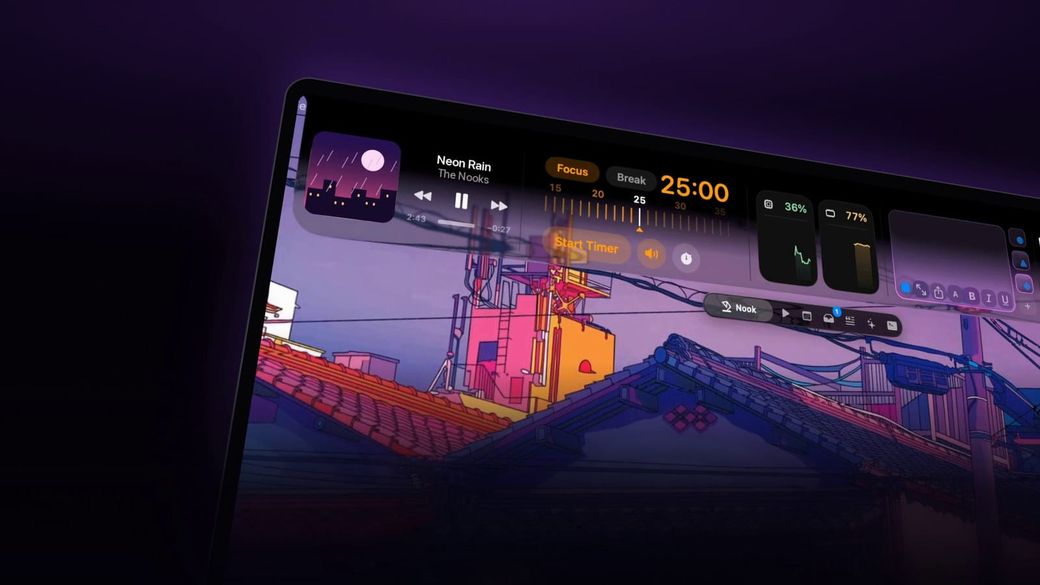
Mac has a Dynamic Island now. Do you still need NotchNook, Alcove or Boring Notch? That is the practical question if you just bought Apple's new MacBook Pro with PROLED XDR Display, or if you are still on an older notched MacBook and wondering whether Apple's built-in island makes a third-party notch app pointless. Apple announced the feature on October 28, 2026, and the laptop has been available since November 6. The honest answer depends on which Mac you have, and on what you actually want the notch to do.
The skim
Apple put a Dynamic Island on the new MacBook Pro with PROLED XDR Display, on sale since November 6. It can house Spotlight, Live Activities and Siri AI on that laptop, but Spotlight moves there only if Siri AI is on. For search or music glances, Apple's version may be enough. Older notched Macs still need a third-party app.
Mac has a Dynamic Island now. Do you still need NotchNook, Alcove or Boring Notch?
For years, the only way to make a MacBook notch act like the iPhone's Dynamic Island was to install a third-party app. That changed for one new laptop. In its October 28, 2026 newsroom release, Apple said “the Dynamic Island now comes to Mac, serving as the home for Spotlight, Live Activities, and Siri AI,” on the 14- and 16-inch MacBook Pro with PROLED XDR Display. Pre-orders opened that day, with availability beginning Friday, November 6.
This is not a general macOS upgrade for every notched Mac. Apple's own help pages describe the feature on the MacBook Pro with PROLED XDR Display. We have not found an official Apple page that offers the same built-in island on older MacBook Pro models, MacBook Air, or other Macs, even those that already have a camera notch or that can run macOS 27 Golden Gate. If your machine is not that 2026 PROLED model, Apple's island is not a documented option for you.
For the laptop itself — display, touch, price and early reviews — see our Gadgets coverage: the announcement and pricing piece, the first reviews, and the November 6 availability story. This article does not re-report that hardware. It asks what Apple's island does, what it leaves out, and whether a notch app is still worth buying.
What does Apple's Dynamic Island on Mac actually do — and what doesn't it do?
On the new PROLED MacBook Pro, Apple puts the island in the center of the menu bar. According to Apple's Mac help guide on the desktop, menu bar and Dock and its Spotlight help page, you can open Spotlight by dragging down from the Dynamic Island. If you then drag the Spotlight window somewhere else, it reopens in that last place. Apple's PROLED touch-gestures guide adds a finger gesture: swipe with one finger from the top edge of the display over the Dynamic Island to “Open Spotlight and Siri AI.”
Live Activities and alerts also appear in that island. Apple's examples include a Voice Memo recording, an AirDrop connection, or a song playing in the Music app. You can click or tap a Live Activity to expand it and, Apple says, make some adjustments — pause or cancel a timer, or move forward to the next song in a playlist. Click or tap anywhere on the screen to collapse it. If two activities are running, a bubble to the right of the island lets you switch; Control-click or touch and hold to hide one. Which apps can show Live Activities is controlled in System Settings → Menu Bar → Live Activities. If you use iPhone Mirroring, Apple says Live Activities from your iPhone also appear in the menu bar.
The newsroom copy also says you can ask a question, pick up a phone call, or control music from the island, and that you can accept an AirDrop request or pause a song with a tap. Treat those as Apple's claims about the built-in feature.
There is an important catch for Spotlight. A footnote on the same newsroom release says: “Spotlight only moves to the Dynamic Island if Siri AI is available and enabled.” If Siri AI is off, unavailable in your language or region, or blocked because you are under 13, do not assume Spotlight lives in the island. Apple's footnotes do not fully agree on which software version brings Siri AI: the October 28 newsroom note says Siri AI is in beta in macOS 27.2; the Spotlight and touch-gestures help footnotes checked the same day say it is in beta in macOS 27 (and the other 27-series operating systems). Both say it needs an Apple Intelligence-enabled device set to a supported language, is available to start in English, French, Japanese, Korean, Portuguese and Spanish, is not available for users under 13, and that some server-side Apple Intelligence features have daily usage limits. We are not choosing between those version numbers; check what your Mac actually offers in System Settings.
Just as important is what Apple's official pages do not describe. They do not list a file tray or drop zone, a to-do list, a notes panel, clipboard history in the notch, a teleprompter, coding-agent approvals, custom widget layouts, or a handle that recreates the same interface on a Mac without this hardware. They also do not say the built-in island is available on older notched MacBooks. Those gaps are where third-party apps still make their case — as maker claims, not as something we have tested on the new laptop.
What do NotchNook, Alcove and Boring Notch add on top of it?
None of these apps is a stand-in for Apple's island on the new PROLED MacBook Pro, and we have not verified how any of them behaves alongside it. They are optional toolkits, and official pages still sell or distribute them for notched Macs in general.
NotchNook, from lo.cafe, is sold in two editions. Pro is the current rebuilt edition: the official comparison table and fact sheet list a Liquid Glass notch (with the classic black look still available), music controls with lyrics, calendar, a file Tray and Pocket, clipboard history, a teleprompter, approvals for Claude Code and Codex, a file converter, Pomodoro and to-dos, and Live Activities such as AirPods and battery. It requires Apple silicon and macOS 14.6 or later. It also officially works on Macs without a notch, through a slim handle at the top of the screen. Classic is the original 1.x app, still sold and updated, with media controls, calendar, Nook widgets, the file Tray and AirDrop. Classic also runs on Intel Macs. Both editions include a 48-hour trial with no card, cover up to two Macs, and include updates for the life of an active license. Official pages checked November 13, 2026, price Pro at US$19 lifetime or US$3 a month, and Classic at US$15 lifetime or US$2 a month. New Stripe purchases carry a 7-day refund if you email support@getnotchnook.com; the site says earlier refund promises are kept, and Paddle purchases follow Paddle's policy.
Alcove markets itself as a Dynamic Island for Mac. The site, showing version 1.7 when we checked, lists notifications, Live Activities, swipe gestures, customizable HUDs and lock screen widgets, and a $12.99 purchase for Mac running macOS 15 or later. Its FAQ, updated June 2026, says a license works on up to three devices, all future updates are included, a 72-hour trial is available, and you can request a full refund within 14 days with no reason required. The same FAQ warns that Alcove relies on private APIs and is sold “as is,” with no guarantee Apple will not change or remove those APIs. That is a real purchase risk, stated by the maker, not a review finding.
Boring Notch is the free, open-source option (GPLv3), with source and releases on GitHub. The project site lists music controls, calendar, a camera mirror, battery status, a file shelf and replacement volume/brightness HUDs. The GitHub README says it runs on macOS 14 Sonoma or later, on Apple silicon or Intel. The catch is also official: the developers say they do not yet have an Apple Developer account, so macOS warns that the app is from an unidentified developer on first launch, and you have to approve it (the site tells you to use Settings → Privacy & Security → Open Anyway; the README also documents a Terminal workaround and a Homebrew cask). The latest stable GitHub release when we checked was v2.7.3, published November 24, 2025; v2.8 release candidates were listed as pre-release nightlies. It is a current, free project, not a freshly dated paid launch.
DynamicLake is another current paid rival. Its official changelog lists a 2.0 update under November 2026, and its 2.0 blog post is dated October 23, 2026. We could not verify a reliable public price on its site in this session, so it is not in the table below and we are not recommending it on price.
How much do these notch apps cost, and what does a license cover?
Prices, seats, trials and refunds below were checked on official pages between 12:37 and 12:39 p.m. MST on November 13, 2026. They can change. Apple's island has no separate price; it is part of the new PROLED MacBook Pro.
| Option | Price (USD) | Requirements | License / seats | Trial | Refund |
|---|---|---|---|---|---|
| Apple Dynamic Island | Included on the MacBook Pro with PROLED XDR Display | Documented only on that 2026 14- and 16-inch model | Built into the laptop; no separate app license | n/a | n/a |
| NotchNook Pro | $19 lifetime or $3/month | Apple silicon, macOS 14.6 or later; notchless Macs supported via a handle | Up to 2 Macs; updates while the license is active | 48 hours, no card | 7 days on new Stripe purchases (see official terms) |
| NotchNook Classic | $15 lifetime or $2/month | Apple silicon or Intel, macOS 14.6 or later; notchless Macs supported | Up to 2 Macs; updates while the license is active | 48 hours, no card | 7 days on new Stripe purchases (see official terms) |
| Alcove | $12.99 one-time | macOS 15 or later (chip support not stated on the pages we opened) | Up to 3 devices; future updates included | 72 hours | 14 days, no reason required |
| Boring Notch | Free (GPLv3) | macOS 14 or later, Apple silicon or Intel | Open source; no paid license | n/a (free to download) | n/a |
Official NotchNook plans and a free trial are at getnotchnook.com, with no tracking on that link. Alcove and Boring Notch should be opened at their own sites. We have not tested any of these apps, and we cannot say whether a third-party notch app conflicts with, hides, or sits beside Apple's island on the new MacBook Pro.
What should you do? A verdict for each kind of user
You have the new MacBook Pro with PROLED XDR Display, and you mainly want search, music or timer glances, AirDrop prompts, or Siri. Apple's island may be enough. Use it first. Check whether Spotlight actually appears in the island on your account — that depends on Siri AI being available and enabled. Skip paying for a notch app until you miss a specific tool Apple does not list.
You have that new laptop and you want a file tray, to-dos, notes, lyrics, a teleprompter, or coding-agent controls in the notch. Those are the kinds of extras official NotchNook Pro and, in a narrower way, Alcove and Boring Notch advertise. Try the 48-hour NotchNook trial or the 72-hour Alcove trial before you pay, and go in knowing we have not verified coexistence with Apple's island. Alcove's own “as is” private-API warning is part of that decision.
You have an older notched MacBook Pro or Air. Apple's Dynamic Island is not documented for your machine. You are choosing among third-party apps, just as before. Boring Notch is the honest free starting point if you will approve an unsigned app. Alcove is the cheaper paid one-time option if you are on macOS 15 or later and want a Dynamic Island-style shell. Choose NotchNook Classic if you need Intel support or the classic Tray-and-widgets set at $15; choose Pro if you have Apple silicon and want the fuller official feature list at $19 or $3 a month.
You use an Intel Mac, or a Mac without a notch. Apple's island is not a documented option. NotchNook Classic is the official Intel paid path; Boring Notch also lists Intel support. NotchNook officially offers the same interface on notchless screens through a handle. We did not find an equally clear official chip or notchless statement for Alcove on the pages we opened.
You do not want to pay, or you want to wait. Start with Apple's island if you have the new PROLED model. Otherwise start with Boring Notch, or wait and use the paid trials. There is no need to rush a $13–$19 purchase for a feature Apple already shipped on one laptop, or for an older Mac that has worked without a notch app so far.
Our take
Apple's Mac Dynamic Island is a real, built-in feature, not a rumor, and for people who just bought the PROLED MacBook Pro it should be the first thing they try. It is also narrower than the marketing around “a Dynamic Island for Mac” has often implied: it is tied to one new model, Spotlight's move into the island depends on Siri AI, and Apple's own pages describe a glance-and-search surface, not a file tray or a widget dock. Third-party notch apps still have a clear job on every older notched Mac, and a conditional job on the new laptop if you want extras Apple does not list. We would not tell a typical new-MacBook-Pro buyer to pay for NotchNook, Alcove or Boring Notch on day one. We also would not tell everyone else that Apple has now solved the notch for them, because official documentation says otherwise.
FAQ
Which Macs have Apple's Dynamic Island?
Apple's newsroom announcement and macOS help pages describe it on the MacBook Pro with PROLED XDR Display, in 14- and 16-inch sizes, announced October 28, 2026, and available since November 6. We have not found an official Apple page that extends the same built-in island to older notched MacBooks or other Macs.
Does Spotlight always appear in the Dynamic Island?
No. Apple's newsroom footnote says Spotlight moves to the Dynamic Island only if Siri AI is available and enabled. Siri AI has language, region, age and usage-limit conditions, and Apple's footnotes currently disagree on whether the beta is tied to macOS 27 or macOS 27.2. Check the settings on your Mac.
Do I still need a notch app on an older MacBook?
If you want that kind of interface, yes, you still need a third-party app, because Apple has not documented a built-in Dynamic Island on those models. If you never wanted a notch app, nothing about Apple's new laptop requires you to start now.
What's the difference between NotchNook Pro and Classic?
Pro is the current rebuilt edition, with a longer official feature list, and it requires Apple silicon. Classic is the original 1.x app, still sold and updated, and it also runs on Intel. Official US prices on November 13, 2026, were $19 lifetime or $3 a month for Pro, and $15 lifetime or $2 a month for Classic. Both offer a 48-hour trial and cover two Macs. We are not treating Pro as a newly dated launch; official changelog pages we opened did not give Pro a public calendar date.
Is Boring Notch really free?
Yes. Official pages present it as free and open source under GPLv3. The trade-off, also stated by the project, is that it is not signed with an Apple Developer account, so macOS will warn you on first launch and you have to approve it yourself.
More on Mac and iPhone software: Skimwire Apps.
Sources: Apple Newsroom, “Apple unveils groundbreaking MacBook Pro with PROLED XDR Display,” October 28, 2026; Apple Support, “Get to know your desktop, menu bar, and Dock”; Apple Support, “Find what you need with Spotlight on Mac”; Apple Support, “Use touch gestures on the PROLED XDR Display”; Apple, macOS 27 Golden Gate; NotchNook homepage, FAQ and Pro fact sheet; lo.cafe NotchNook page; Alcove and Alcove FAQs; Boring Notch and TheBoredTeam/boring.notch. Official app prices and requirements rechecked November 13, 2026, 12:37–12:39 p.m. MST (America/Denver).