Xbox Cloud Gaming now lets you use your phone as a controller on smart TVs
The preview puts touch controls in your phone's browser. In the US, the Nano Controller can also connect straight to the cloud over Wi-Fi.

The skim
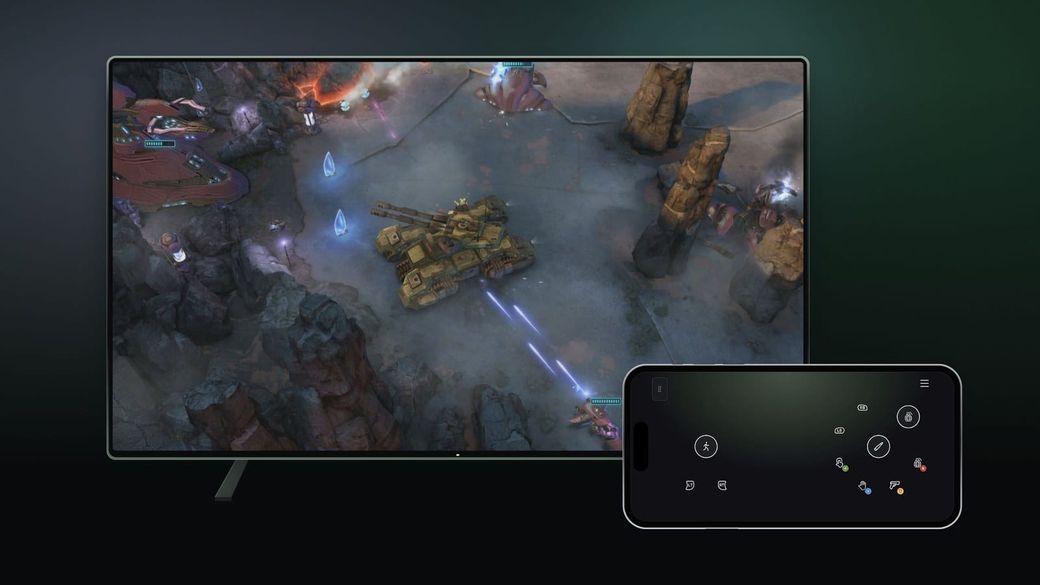
- Xbox Cloud Gaming is testing a way to use your phone as a controller when you play on a supported smart TV, with touch controls that open in your phone's web browser. No gamepad needed.
- To try it, turn on Preview Features under Settings > Account in the Xbox app on your TV, then launch a game without a controller connected.
- In the US, the $49.99 Xbox Nano Controller is also getting a preview of "cloud connect," which links it over Wi-Fi straight to the cloud server instead of to your TV.
What happened
Microsoft announced both previews on Xbox Wire on Nov. 4. The first targets people who want to try cloud gaming on a TV but don't own a controller. When you start a game on the latest supported smart TV version of Xbox Cloud Gaming without a controller connected, you'll now get the option to use your phone instead. Android Authority reports that you pair by scanning a QR code on the TV, and the touch controls then load in your phone's browser, so there's no app to install.
Xbox says the phone controller preview is rolling out in countries where Cloud Gaming is supported. You have to opt in first: go to Settings > Account in the TV app and turn on Preview Features.
The second preview is for the Xbox Nano Controller that launched this week. Normally a controller talks to your TV over Bluetooth, and the TV passes your button presses along to the cloud. With cloud connect, the Nano uses Wi-Fi to talk directly to the Xbox server running your game. The Verge notes that this skips a step, which can cut input lag. Cloud connect is US-only for now and works on supported smart TVs and in the web browser.
How to set up cloud connect
- Android: set it up in the Xbox beta app.
- PC: use the Xbox Accessories app. Xbox says this route requires joining the Xbox Insider program.
- Xbox has a setup guide on its support site for the full steps.
Why it matters
The biggest hurdle for TV cloud gaming is that you still need a controller. Letting a phone fill in removes that, at least for slower-paced games where touch controls are good enough. Google's Stadia offered a similar Wi-Fi controller trick years ago, and it was one of the better parts of that service.
Touch controls on a phone won't feel like a real gamepad, so think of this as a way to try a game, not a replacement. If you play on a TV a lot, the Nano plus cloud connect is the more interesting part of this news, especially if Bluetooth lag has bugged you.
Both features are previews, so expect rough edges, and Xbox may change them before a wider release.
Sources: Xbox Wire, The Verge, Android Authority.