Apple Watch's Live Rewind and Siri Recap are now in beta
Live Rewind shows the last 15 seconds of speech as text, and Siri Recap summarizes conversations. Both need a Series 12 or Ultra 4.

The skim
- Apple Watch's Live Rewind and Siri Recap features are now in developer beta with watchOS 27.3, TechCrunch and Engadget report.
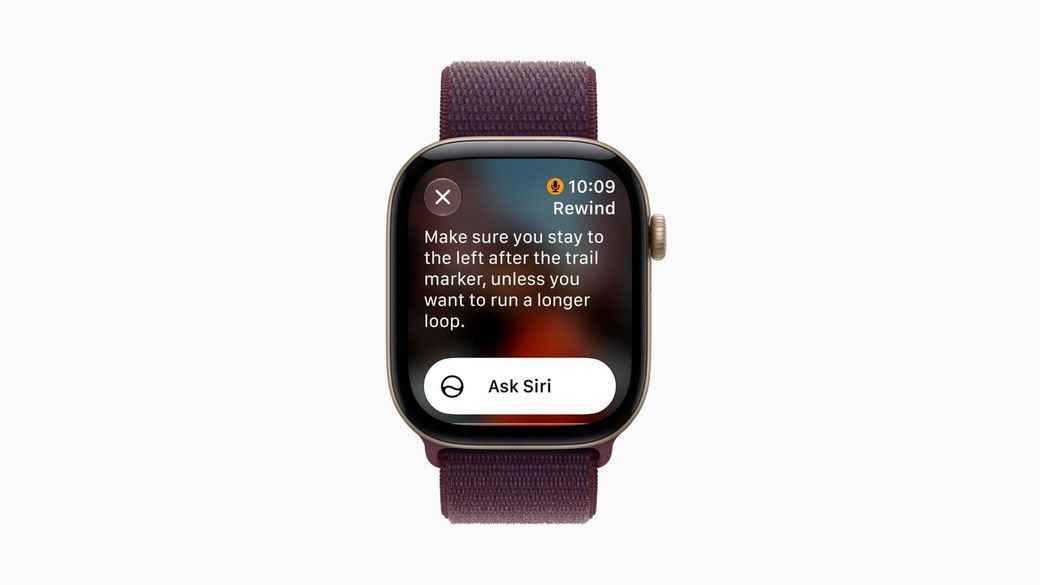
- Live Rewind turns the last 15 seconds of speech into text when you double-press the Digital Crown. Siri Recap writes short summaries of your conversations.
- Both need an Apple Watch Series 12 or Ultra 4 and an Apple Intelligence iPhone. They start in English only and won't initially be available in the EU.
What's new
Apple announced four "Audio Intelligence" features with the Apple Watch Series 12 and Ultra 4 in September. Apple said the two that listen to conversations, Live Rewind and Siri Recap, would come in beta later in the year, and they've now reached testers: TechCrunch says they're rolling out first to developers with the 27.3 updates, and Engadget confirms the watchOS 27.3 beta includes them.
Live Rewind is for the moment you miss something: a gate change at the airport, a list of specials, a name. Double-press the Digital Crown and the watch shows what was said in the previous 15 seconds as a text snippet. You can ask Siri about it or save it to the Siri app. If you do nothing, Apple says the snippet disappears about 30 seconds after the display dims.
Siri Recap goes further. When you turn it on, it takes notes on conversations you're part of and produces a title plus a few key points, such as dates, deadlines or prices. Apple's support page stresses that it's "a brief, high-level summary, not a detailed record or transcript." You can schedule it by time or location ("only at work" or "never at night") and switch it off from Control Center. Unsaved recaps delete themselves after 7 days.
The privacy question
An always-listening wrist is an obvious worry, for you and the people you're talking to. Apple says the features never create audio recordings, and that raw audio is processed in a protected area of the S11 chip that the operating system, apps and Apple can't access. Siri Recap's final summaries are made on Apple's Private Cloud Compute servers, which Apple says don't keep the data. Saved recaps sync end-to-end encrypted through iCloud.
For the people around you, Live Rewind plays a chime from the watch speaker even when the watch is on silent, and it shows an animation and a microphone indicator, according to Apple's privacy overview. Siri Recap doesn't identify who said what, and Apple says it's designed to leave out sensitive details such as financial and login information.
Who can use it
Per Apple, you need an Apple Watch Series 12 or Ultra 4 paired with an Apple Intelligence-enabled iPhone 16 or later (excluding iPhone 16e). Both features start in English, aren't initially coming to the EU, and are subject to daily usage limits because they rely on server-side models.
What's next
TechCrunch says the features will move to the public beta before a general release, and Apple has said they'll be available in beta in late 2026. Unless you test software for a living, wait for that or the final release: beta builds can be buggy.
Sources: TechCrunch, Engadget, Apple Support, Apple privacy overview and Apple Newsroom.